> For the complete documentation index, see [llms.txt](https://eigenphi-1.gitbook.io/arbitrage-scan-user-guide/llms.txt). Markdown versions of documentation pages are available by appending `.md` to page URLs; this page is available as [Markdown](https://eigenphi-1.gitbook.io/arbitrage-scan-user-guide/liquidation/liquidator-details.md).
# Liquidator Details
If you want to be an efficient liquidator, this detail page is a no-brainer.
Summary displays the rundown of the current liquidator in the selected period.
**Liquidator Behaviors** examines the relationship between the liquidation amount and the counts of liquidations. The figure will also show the liquidator's performance if he or she appears on more than 1 protocol on a certain day.
The logic of **Profit Distribution** here is the same as the [MEV Transaction Profit Distribution](/arbitrage-scan-user-guide/home/mev-transaction-profit-distribution.md) on the homepage, except it focuses on the current liquidator.
**Liquidator Performance** indicates the profit, cost, and liquidation amount by date.
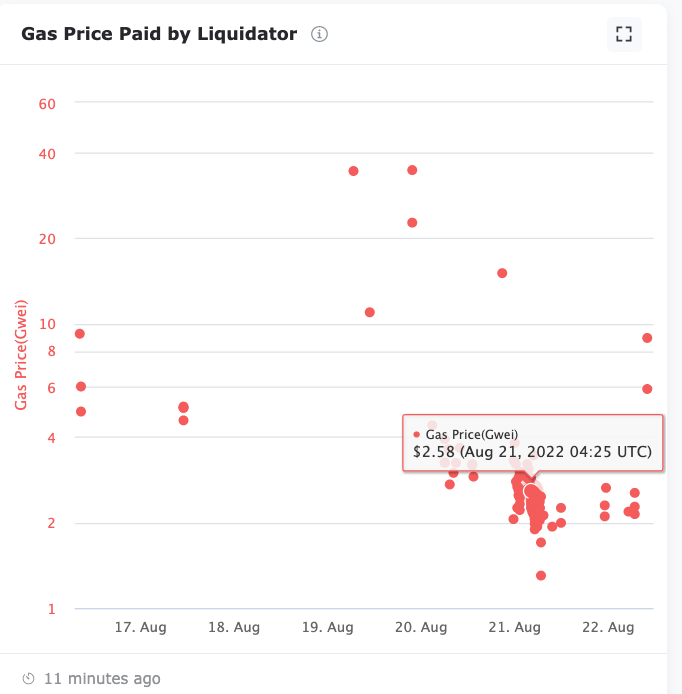
A spot chart is used to enumerate the **Gas Price Paid by Liquidator.** We can tell from the chart below that the gas price at the indicated time is $2.58. for the liquidation.
**Latest Liquidation** lists all the liquidations done by the current liquidator in chronicle order. Other than revenue, liquidation amount, and [liquidation LTV](https://eigenphi-1.gitbook.io/classroom/glossary/liquidation/ltv), the other 3 columns in the list can be examined in detail.
* **Tx** hash takes you to the [liquidation transaction detail](/arbitrage-scan-user-guide/liquidation/liquidation-transaction.md).
* The **Liquidation Asset** column's token symbols show you the [detailed token profile](/arbitrage-scan-user-guide/home/universal-search/token-profile.md).
* The **Protocol** column's data takes you to the [Liquidation Protocol Overview](/arbitrage-scan-user-guide/liquidation/liquidation-protocol-overview.md) page.
**Liquidation Leaderboard** reveals the current liquidator's top transactions ranking by profit, top liquidations ranking by amount, top liquidated assets ranking by amount, and top liquidated borrowers ranking by amount.
**Tx Profit** leaderboard tab shows the top 10 liquidation transactions ranked by profit.
Click on the row, and you can examine the details of the [liquidation transaction.](/arbitrage-scan-user-guide/liquidation/liquidation-transaction.md)
You can also click the Asset, and Protocol to view their details.
The **Liquidations** tab displays the top 10 liquidation transactions using Liquidation Amount as the ranking condition. You can also examine the transaction detail, assets, and protocols of these transactions.
The **Liquidated Assets** tab lists tokens ranked by liquidation amount. Click the asset symbol and name, you can examine [its profile](/arbitrage-scan-user-guide/home/universal-search/token-profile.md).
The **Liquidated Borrowers** tab displays the borrowers' data ranked by liquidation amount. You can also find their liquidation transaction number and liquidated assets number.
Click the Borrower's address to view [its detail](/arbitrage-scan-user-guide/liquidation/liquidated-borrowers.md).